
DeepSeek’s official benchmark graphic compares V4-Flash-Vision-Exp with V4-Flash-0731 and Opus-4.8. Source: DeepSeek’s announcement on X.
DeepSeek Vision API is no longer a rumour or a community workaround. On August 21, DeepSeek added the experimental model deepseek-v4-flash-vision-exp to its API platform and published a dedicated Vision guide. The change is easy to miss if you only look at the older deepseek-v4-flash model page: this is a separate model id, with image input enabled from day one.
The practical question is not whether the model can “see”. It is how you send the image, which limits you hit, and whether the new multimodal path is ready for the workflow you actually run. This guide answers those questions from the official docs, then adds a little context from the first community write-ups. We have not run a Mengbi benchmark against a live API key, so performance claims are labelled as DeepSeek’s claims rather than presented as independent test results.
Quick answer: is DeepSeek Vision API live?
Yes. The documented model is deepseek-v4-flash-vision-exp. It accepts text plus JPEG, PNG, GIF, or WebP images through the OpenAI-compatible Chat Completions format. DeepSeek also documents the Responses API, an Anthropic-compatible /messages endpoint, and a Files API for images you want to upload once and reuse.
For a first request, use a small screenshot or chart, put the image in a user message, and start with detail: "low" when you only need a quick read. Do not point an existing text-only integration at this model by accident: the model id is part of the feature, and other DeepSeek models return an image-not-supported error according to the docs.
The short version:
| What changed | What it means in practice |
|---|---|
deepseek-v4-flash-vision-exp is available on the API platform | You can send image and text input without a third-party vision proxy |
| OpenAI, Responses, and Anthropic-compatible formats are documented | Existing SDK shapes can usually be adapted instead of rewritten |
Files API supports file_id references | Reusable source images do not have to be uploaded in every prompt |
| Image accounting is capped at 384 tokens per image | Large images are resized for billing, but upload and dimension limits still apply |
How to use the DeepSeek Vision API
The official API keeps the familiar OpenAI-compatible endpoint at api.deepseek.com/chat/completions. The important difference is the content array inside the user message. One block carries your instruction; the other carries an image_url object.
This is an adapted example based on DeepSeek’s request shape, not a claim that Mengbi executed it. Keep the key on your server, add a timeout, and log the model id alongside the request. A surprisingly common integration bug is to accept an uploaded file in the UI and then silently send only its filename to the model.
If your stack already uses Anthropic’s message format, the same image can be represented as an image block with a source of base64, url, or file. DeepSeek’s Anthropic-compatible documentation covers that translation. The Responses API uses input_image parts. Pick one request shape for the first integration; adding three adapters at once makes failures harder to diagnose.
DeepSeek V4 Flash Vision-Exp image input methods
The Vision guide gives you three input paths. They solve different problems, so “which one is best?” depends on whether the image is private, reusable, or already hosted.
| Method | Use it when | The catch |
|---|---|---|
| Base64 data URL | A small, private image is already in memory | It counts toward the 48 MiB request-body limit |
Public http(s) URL | Your image is already hosted and can be fetched by DeepSeek | The URL can be at most 8192 characters; the image must download within 60 seconds |
Files API file_id | A PDF page, screenshot set, or product image will be reused | You need an upload step and a small piece of file-id state |
Base64 is convenient for a one-off screenshot. URLs keep the JSON readable and are easy to retry, provided the asset is reachable from DeepSeek’s servers. The Files API is the better fit for a document-review queue: upload once, retain the file_id, and reference the same source in later prompts. DeepSeek’s Files API guide describes the upload and reuse flow.
The model does not identify an image by its filename alone. The docs say detection is based on the actual file content rather than a misleading extension or MIME label. That is useful protection against badly labelled uploads, but it is not a reason to skip validation on your side.
Detail levels, token accounting, and hard limits
Image understanding has two separate constraints: what the model can inspect and what the API will accept. Mixing them up is how teams end up with a request that is technically valid but too slow, too large, or too expensive for a batch job.
| Setting or limit | Official value | How to plan around it |
|---|---|---|
detail: low | Downscales to 512 × 512 | Use for broad classification, quick OCR, or thumbnails |
detail: high / original | Keeps the source resolution | Use when small labels or chart axes matter |
detail: auto | Currently equivalent to original | Choose explicitly if you want behaviour to be obvious in logs |
| Image token accounting | Around 800 × 800 after resizing; up to 384 tokens per image | Cost is bounded, but transport size is not unlimited |
| Maximum dimension | 8192 px per side | Resize camera originals before sending them |
| 15 or more images | Maximum dimension drops to 4096 px per side | Split large batches into smaller, named groups |
| Images per request | 600 | A practical pipeline should use far fewer for latency and reviewability |
| Request body | 48 MiB | Base64 grows quickly; use URLs or Files API for larger assets |
| One image without a file id | 32 MiB | Compress before upload |
| One Files API image | 64 MiB | Keep source files below the cap even if storage is reusable |
| Total image size | 64 MiB without file ids; 200 MiB when file ids are included | Treat the total as a batch budget |
There is also a role rule that is easy to miss: with Chat Completions, images belong in user messages. Putting an image in a system or assistant message produces a 400 response. Add a contract test for this before wiring the model into a multi-agent harness.
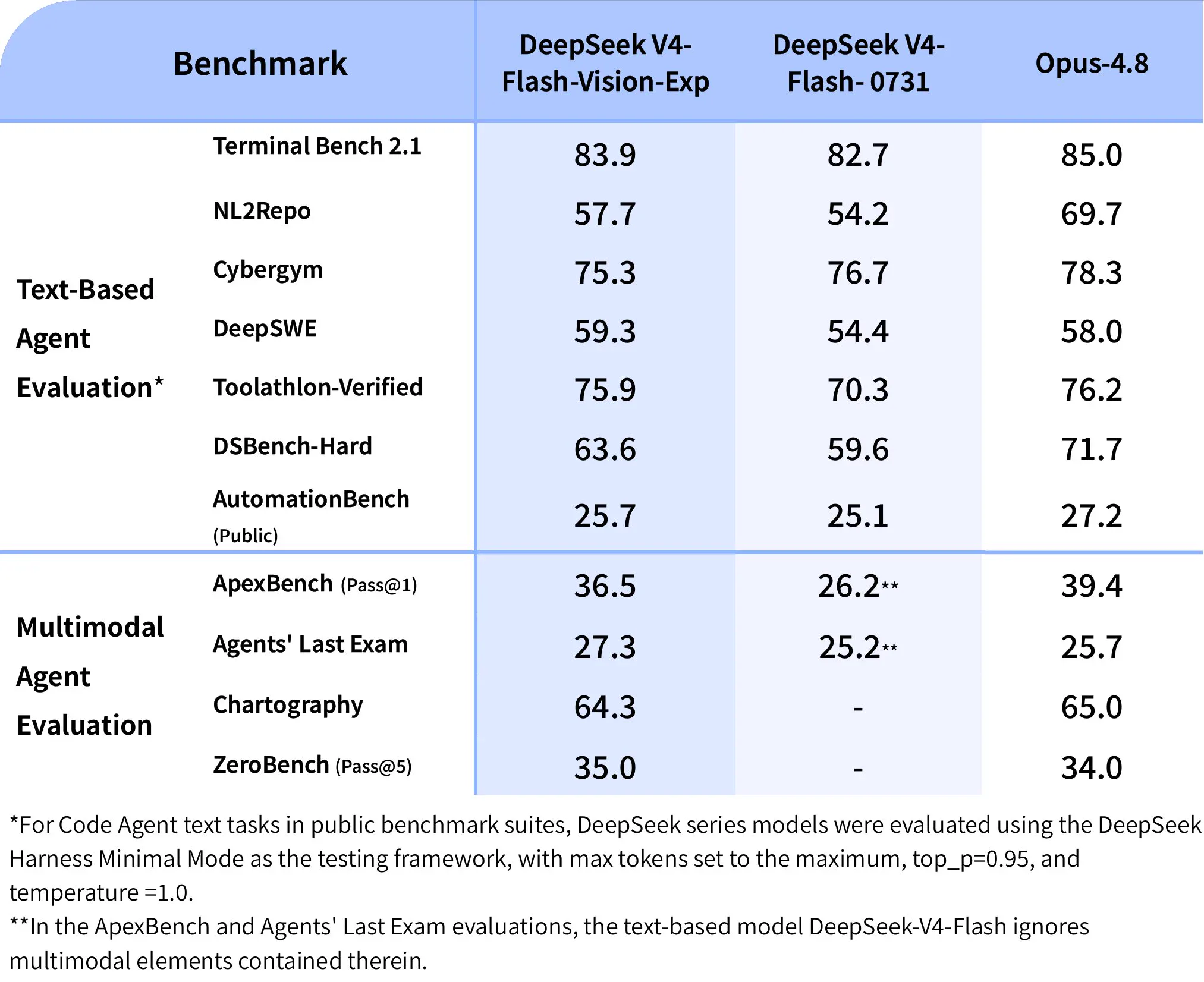 The official announcement’s table includes text-agent and multimodal-agent rows. The numbers are DeepSeek-reported, with the evaluation setup and footnotes shown in the source graphic; they are not an independent Mengbi test.
What the official benchmark graphic does — and does not — tell us
DeepSeek’s announcement says that the new model keeps V4-Flash’s text capabilities for agents, reasoning, and world knowledge, while making a “major leap” on multimodal-agent performance. The graphic compares DeepSeek V4-Flash-Vision-Exp, DeepSeek V4-Flash-0731, and Opus-4.8 across text-agent and multimodal-agent evaluations.
That is useful launch context, not a universal leaderboard. The footnote says the code-agent rows use DeepSeek Harness Minimal Mode with specific generation settings, and another note says the text-only V4-Flash model ignores multimodal elements in two multimodal evaluations. In other words, the image documents DeepSeek’s test setup as much as it documents the scores.
The first community summary on Reddit is helpful for spotting what developers care about—the 384-token image cap, the user-role restriction, and the three upload methods—but it is a digest of the docs, not a separate evaluation. Earlier V4 Flash reviews, such as the 51CTO hands-on report and DataLLM Lab’s bounded review, are useful context for the text model and API economics. They predate this vision release, so they should not be read as evidence about image accuracy.
Where this model is useful first
The most credible early use cases are the ones where an image is an input to an existing text workflow:
- Screenshot triage. Ask for visible error text, UI labels, or a concise reproduction checklist before a human opens the ticket.
- Chart and dashboard reading. Extract labels and directional changes, then ask a second pass to point out what the chart does not prove.
- Document review. Render selected PDF pages, upload the images through Files API, and keep the question and source page together in your audit trail.
- Agent loops. Let an agent inspect a screenshot of a browser state or terminal error, but keep the action policy and final approval outside the model.
- Chinese-language visual work. Product screenshots, receipts, and local dashboards often contain mixed Chinese and English labels. This is a sensible place to compare the new model with the vision model your team already trusts.
The last point matters for Mengbi’s audience. The new API is not a reason to throw away a working stack. It is a new candidate for the image-reading step, especially when the rest of the workflow already uses DeepSeek for structured reasoning or agent calls. Our AI coding agent comparison covers the surrounding terminal and IDE workflow; this article is about the model boundary where pixels become structured input.
A production-minded first integration
Start with a narrow contract rather than a general “look at anything” endpoint. Define the accepted file types, resize policy, maximum dimensions, timeout, and output schema. Store the original image hash and the model id with every result. If the answer drives an automated action, require a second validation step or human confirmation.
For batch work, route images by purpose. Low detail is a reasonable default for thumbnails and broad classification. Use high or original detail only when the small text changes the decision. Keep a retry budget, but do not blindly resend a 30 MiB base64 payload three times; switch to a hosted URL or Files API when the transport is the problem.
Finally, separate “the model saw the image” from “the model was correct”. Log the source page, the question, the returned text, and the reviewer’s correction. That gives you an evaluation set you own instead of relying on a launch graphic or a vendor leaderboard.
Is DeepSeek V4 Flash Vision-Exp ready for production?
It is ready for controlled experiments and small, observable workflows. The API surface is concrete, the limits are documented, and the input formats fit common OpenAI and Anthropic adapters. The -exp suffix is still important: it signals that teams should expect behaviour, availability, or pricing details to change.
We would not make it the only vision model in a high-stakes pipeline yet. Run a small parallel set against your current provider, measure OCR and chart errors on your own images, and decide whether the latency, access, and review burden fit the job. The right question is not “is it as good as Opus?” It is “does it make this particular workflow cheaper or easier without hiding new failure modes?”
FAQ
What is the DeepSeek Vision API model name?
The official model id is deepseek-v4-flash-vision-exp. It is separate from the text-only deepseek-v4-flash id, and the Vision guide says other models will reject image input.
Can I send a local image to DeepSeek?
Yes. Convert the bytes to a base64 data URL, or upload the image through the Files API and send the returned file_id. A private local path is not a URL that DeepSeek can fetch directly.
How many tokens does an image use?
DeepSeek’s Vision documentation says images are resized to around 800 × 800 for token accounting and capped at 384 tokens per image. That accounting rule does not remove the separate request-size and pixel-dimension limits.
Is the Opus-4.8 comparison independently verified?
Not in this article. The comparison comes from DeepSeek’s own announcement graphic and test setup. Treat it as a vendor-reported launch claim until an independent evaluation publishes a reproducible result.
Does DeepSeek Vision API support Anthropic-style messages?
Yes. DeepSeek documents an Anthropic-compatible /messages endpoint with image blocks. The content shape is different from OpenAI-compatible Chat Completions, so keep the adapter explicit instead of trying to send one payload to both endpoints.
Sources and review notes
The capability and limit details in this guide were checked against the official Vision guide, official pricing page, and DeepSeek’s launch announcement on August 21, 2026. Community context comes from the r/DeepSeek launch summary, the 51CTO V4 Flash report, and DataLLM Lab’s independent text-model review. No live API request was run for this article; examples are documentation-based and should be validated with your own key and image set.
Last reviewed: August 21, 2026.