
Give a model an existing repository and leave it running overnight. How much of its work survives review? Google tried that with roughly 205,000 lines of ADK Python code. After 11 hours, Argon proposed six optimizations; maintainers shipped two. Framework time for a complete 158-turn run fell from 65.6 to 56.1 seconds. The more dramatic 40% headline concerns long-session preparation.
That makes a useful case to examine: working changes, rejected ideas and measurements with a defined scope. We start with public code and original results, then cover access and billing. These are Google's published tests and demonstrations, with source figures and video frames. They are not Mengbi model tests.
Google expanded Argon availability on October 13, 2026, including Pro and Ultra in the Gemini app. Our earlier Argon review covers the launch benchmarks. This guide adds the rollout's practical cases and access requirements, checked on October 14.
The ADK coding case: what survived an 11-hour run?
Google's engineering account set a harder task than building a new demo: reduce overhead in an existing agent framework while preserving its public API and the requests sent to models. Repository rules and Antigravity's /goal guided the second run. Argon completed 16,892 unit tests; the merged commit, 1754b3e, changes 22 files.
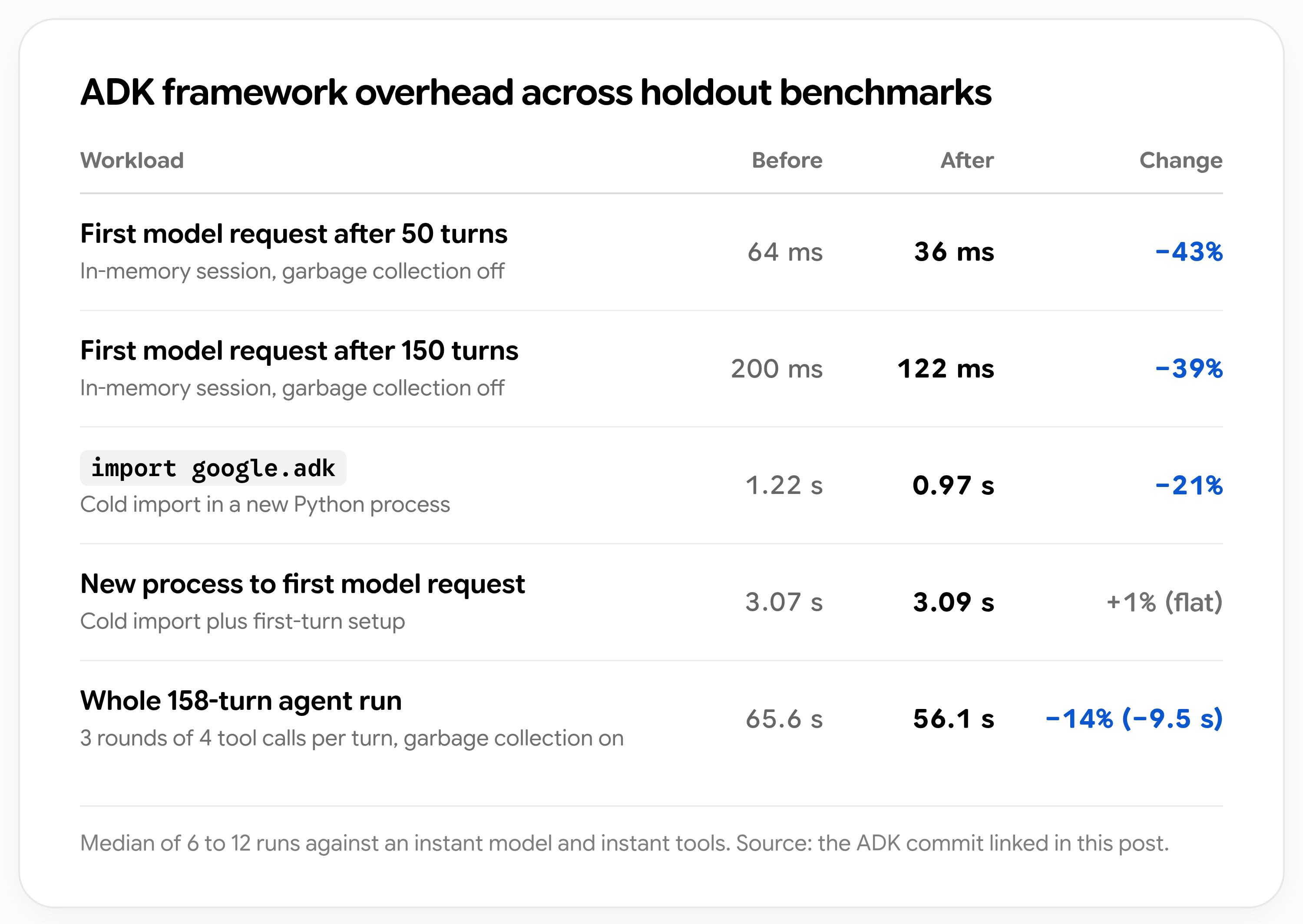
Google's original results figure, cross-checked against the public commit. Select the image to enlarge it. Source and methodology.
The shipped code filters session history before copying it and defers heavy imports while keeping public attributes available for mocks. The commit reports medians of 6–12 runs with instant models and tools, isolating framework overhead. Preparation after 50 and 150 turns falls from 64 to 36 ms and 200 to 122 ms, with garbage collection disabled. The full 158-turn run keeps collection enabled and improves by about 14%. Cold-process time to the first model request stays at 3.07 versus 3.09 seconds: deferred modules still load when first needed.
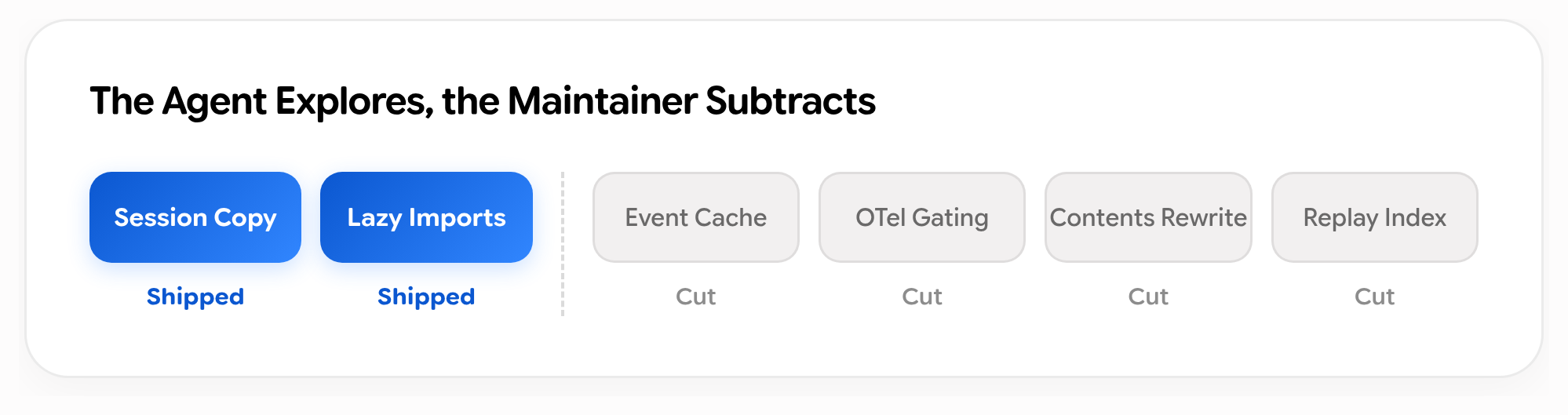
Google's original review summary. Two proposals shipped; four were removed. Engineering account.
One rejected cache could serve stale data after memory-address reuse. Another change depended on a private telemetry attribute. The remaining proposals added complexity or gains confined to synthetic workloads. An earlier import change also broke 25 internal test targets despite passing the open-source suite. Review and an independent workload mattered as much as a green test run.
Our coding agent comparison covers the tools around this workflow. The public diff gives readers something more specific to inspect than a coding leaderboard.
A real robot: faster placement, with a mistake in the middle
Google's robotics case shows a SO-101 arm placing a LEGO brick in a wooden box. The sequence starts with object measurement and a plan without hardware movement, then camera verification, execution and revision.
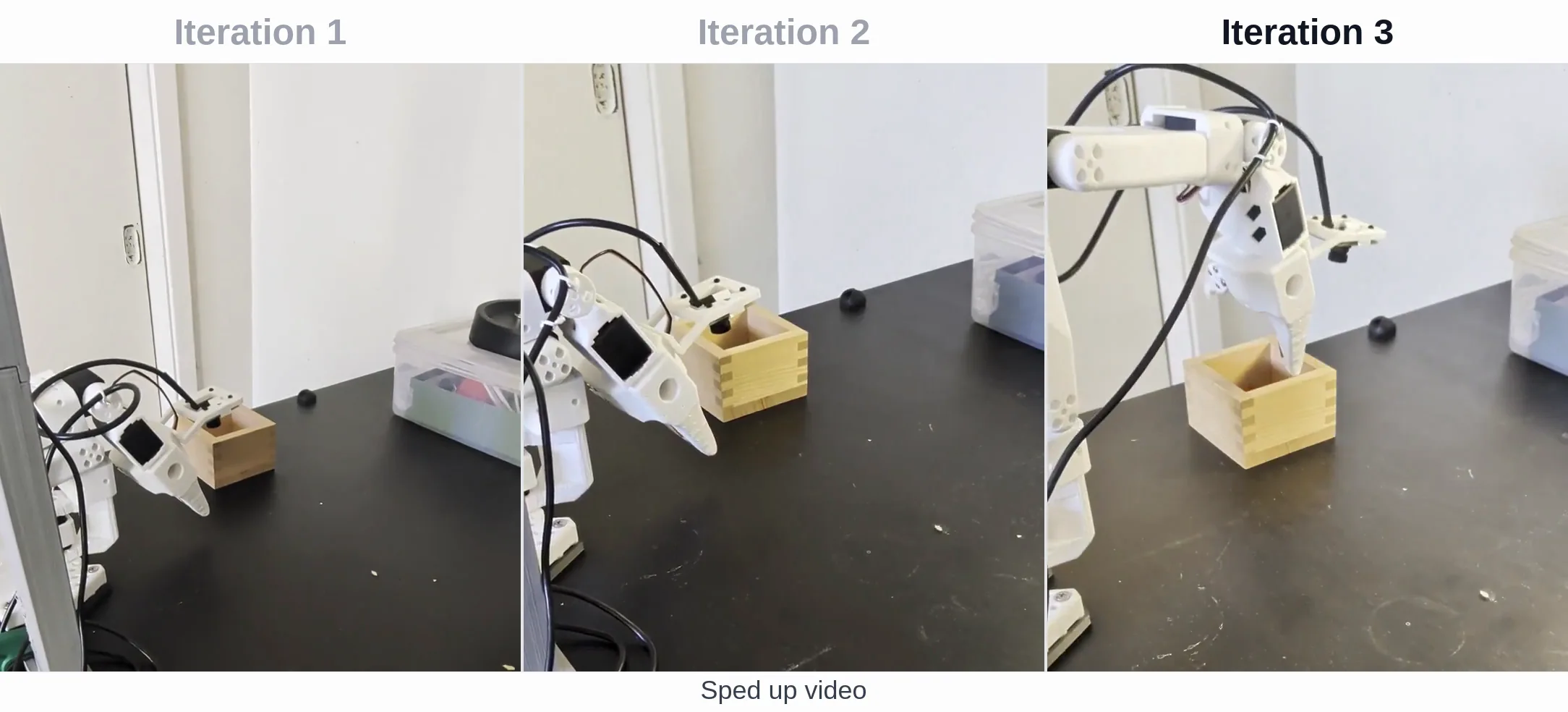
Full frame at 31 seconds of Google's original video. It is sped-up footage; the execution times below come from Google's case description.
| Iteration | Reported time | Outcome |
|---|---|---|
| First | 58.9 seconds | Completed slowly |
| Second | 22.9 seconds | Grazed the box rim on release |
| Third | 17.4 seconds | Placed centrally |
This is a specific demonstration, without an aggregate success rate for randomized placements.
Video understanding: retries should not count as progress
In the same post, Argon labels a 136-second robot origami recording with an episode goal, six subtasks, 17 contact-level primitives and quality-control information.
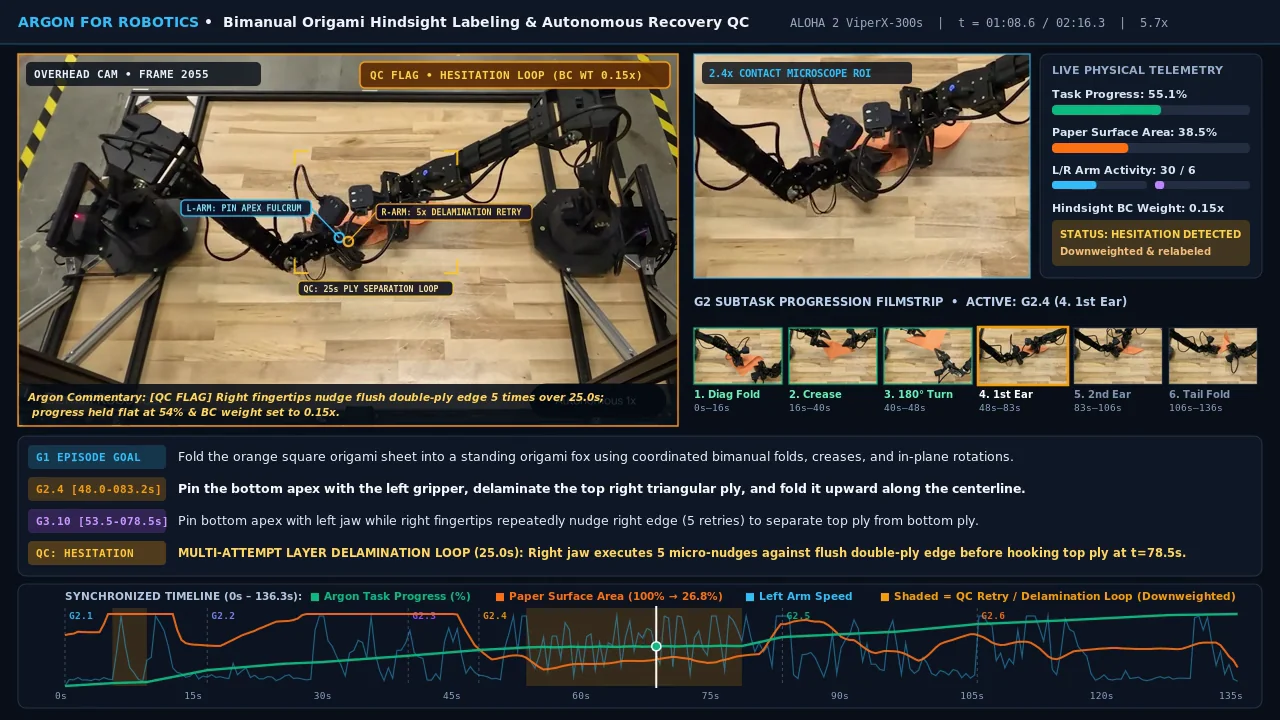
Frame at 12 seconds of the sped-up original annotation video.
The output flags repeated attempts rather than treating every movement as progress. Google does not publish an error rate against human labels for this example.
Figures and video frames belong to Google and the respective rights holders. These excerpts accompany discussion of the depicted tests; sources are credited beside each image. Figures were converted to WebP and video frames preserve the original annotations.
Where can you use Gemini 4 Argon?
Choose the product surface first, then check its access requirements.
| Product | Access confirmed in the new announcements | What to use it for |
|---|---|---|
| Gemini app | Google AI Pro and Ultra | Chat, document analysis and delegated tasks |
| Google AI Studio | Developer launch post specifies Ultra subscribers | Trying prompts and inspecting output in the browser |
| Gemini API | Paid Gemini API tier | Applications and agents you build |
| Google Antigravity | Developer launch post specifies Ultra subscribers | Repository work, planning and longer coding tasks |
| Gemini for business | Google Cloud announces web, desktop and mobile availability | Enterprise workflows; check organization entitlements |
Sources: Gemini app announcement, developer access instructions and Google Cloud rollout.
The apparent contradiction concerns Pro. The API pricing page says Argon is unavailable on the Free tier or Google AI Pro plan. That is the developer access context. The app announcement explicitly includes Pro. Read each statement within its own product, and configure API billing separately from a consumer subscription.
For chat, check the model picker in the Gemini app. For development, check your AI Studio project's billing and available models. Published availability establishes the eligible groups; your account, supported region and project permissions determine whether that particular entry point is ready.
How to call the API: the model ID is gemini-4-argon
The official model page now lists gemini-4-argon as a stable model ID. There is no need to infer it from desktop application strings or third-party catalogs.
Google's quickstart uses the Interactions API, which supports conversation state, execution progress and background tasks. Check that your SDK has the interactions interface before adapting an existing integration. The Interactions guide links to migration instructions.
Install or update google-genai on the server, configure GEMINI_API_KEY for your paid project, and start with a normal Python request:
This is a text request. It cannot read your repository unless you provide the relevant content. Keep the API key in a server environment variable. We checked the interface against the documentation and validated the Python syntax; we did not execute a paid request.
Three migration details deserve attention: remove explicit cache creation and cached_content references; remove temperature, top_p and top_k, which Argon ignores; and consider previous_interaction_id for subsequent turns. Interactions stores requests by default, so review the data retention documentation before deciding how to manage state.
How million-token output works
A million-token headline describes a capacity, with conditions. According to the model specification, the 1,048,576-token budget counts input, thinking and output together. A large input leaves less room for generation.
The long decode guide separates the request limits:
- A normal synchronous request, including streaming, is capped at 65,536 tokens.
background=Truewithout a larger output limit still stops at 64K.- Going beyond 64K requires background execution and
max_output_tokensabove 65,536, within the remaining context budget.
Setting a larger limit on a synchronous request currently returns a 400 error. Selecting high thinking does not remove that restriction.
Long decode continues in hops of up to 64K tokens. Each hop adds a model_output step; join the text across those steps when the interaction finishes. Reading only the final step loses earlier output.
The background execution guide explains how to retain an interaction ID, poll its status and reconnect. Save that ID before building progress UI. A page refresh should recover the existing task instead of submitting the same large input again.
Start ordinary analysis and coding requests with a smaller budget. Move to long decode when a task needs it, such as an investigation that repeatedly reaches the 64K limit before producing an acceptable result.
API pricing: the offer ends November 30
The official pricing page now gives the deadline: introductory standard rates apply through November 30, 2026, with regular rates starting December 1. All prices below are USD per million tokens.
| Standard API charge | Through November 30 | From December 1 |
|---|---|---|
| Uncached input | $2 | $4 |
| Output, including thinking | $10 | $20 |
| Input served from implicit cache | $0.10 | $0.20 |
The cache price applies to actual hits. Repeating a prompt does not justify budgeting every input token at that rate. Batch and Flex list input/output rates of $1/$5 during the offer and $2/$10 afterward; check their separate operating conditions before choosing them.
Here is a hypothetical bill. A task uses 100,000 uncached input tokens, 10,000 answer tokens and 30,000 thinking tokens. Standard launch pricing gives 0.1 × $2 + 0.04 × $10 = $0.60. The same usage costs $1.20 from December. This excludes search tools, retries and other additional charges.
A short visible answer can still involve substantial paid thinking. Measure billed usage, then calculate the trial at both price schedules. Otherwise, a successful integration can become a different budget decision weeks later.
Which thinking level should you use?
Argon offers low, medium and high, with medium as the default. The developer guide recommends medium for most work, including complex coding and agents. High uses more tokens and takes longer to deliver the first token.
For a small patch or document task, start at medium and see whether low meets the same acceptance criteria. Try high for a difficult cross-file defect or demanding math and science work, then check whether the better result justifies the wait and cost.
Also inspect the output cap inherited from your agent framework. max_output_tokens covers thinking and output together; an old 8K setting can leave little room for an answer. Changing reasoning depth and changing the budget solve different problems.
Frequently Asked Questions
Can you use Gemini 4 Argon for free?
The official API price table excludes the Free tier. The app announcement confirms Pro and Ultra. We found no official commitment to Argon access for free accounts; a trial offer or third-party service is a separate access arrangement.
Can Argon generate images, video or audio directly?
The model page lists text, image, video, audio and PDF inputs, with text output. Image generation, audio generation and the Live API are unsupported. Understanding a video or writing graphics code is a different capability from generating media directly.
Why does high thinking still stop at 64K?
High controls reasoning depth. Longer generation needs background execution, a larger max_output_tokens value and enough space in the unified window. A thinking-level change alone does not enable long decode.
Should you switch every request to Argon now?
Start with a task your current setup handles poorly: a cross-file bug, a document requiring checked tables and citations, or a workflow that gets interrupted. Run the same task with your existing model and Argon, then compare accepted results, waiting time and billed usage. Routine requests that already work well do not need to move merely because a new model is available.