
If you already use Sol for development work, this is an upgrade worth putting through your acceptance tests. The uncached token price stays the same. The more interesting question is whether the model gets a difficult task right with fewer retries—or whether you can reduce the reasoning effort and still accept the result.
This review checks OpenAI’s announcement and developer documentation against independently measured results from Artificial Analysis. Sources and figures were reviewed on October 1, 2026. We did not run a separate controlled model experiment for this article. Vendor benchmarks, independent tests and our recommendations are identified separately throughout.
What is GPT-6.1 Sol, and where can you use it?
GPT-6.1 Sol was released on September 29, 2026. Its API identifier is gpt-6.1-sol. OpenAI describes it as a lower-cost option for complex coding and professional work in its API changelog.
The launch availability covers ChatGPT Work and Codex for Plus, Pro, Business, Enterprise and Edu. Ordinary Chat is a separate surface: the launch announcement says Sol 6.1 was not yet available there. Check the current picker and your workspace permissions rather than assuming every ChatGPT conversation has the model.
The distinction matters. A model accessed through Codex may have repository tools, approvals and a working environment. An API call only gets the tools your integration supplies. A good result in one environment does not prove that renaming the model in another will reproduce it.
| Specification | GPT-6.1 Sol |
|---|---|
| API model ID | gpt-6.1-sol |
| Context window | 1,050,000 tokens |
| Maximum output | 128,000 tokens |
| Knowledge cutoff | April 30, 2026 |
| Native input / output | Text and images / text |
| Reasoning effort | low, medium, high, xhigh, max |
| Default effort | medium |
| Fine-tuning | Not supported |
These specifications come from the official model page. Image input lets the model inspect a screenshot or chart; it does not make the base model an image generator. Image generation is a separate tool. Audio and video are not listed as native modalities.
GPT-6.1 Sol API pricing: read the whole bill
The following are Standard processing prices in US dollars per million tokens, checked against OpenAI’s API pricing on October 1. Short-context rates apply to prompts with up to 272K input tokens.
| Model | Input | Cached input | Cache write | Output |
|---|---|---|---|---|
| GPT-6.1 Sol | $2.00 | $0.10 | $2.50 | $10.00 |
| GPT-6 Sol | $2.00 | $0.20 | $2.50 | $10.00 |
| GPT-6 Astra | $10.00 | $1.00 | $12.50 | $50.00 |
| GPT-6 Luna | $0.10 | $0.01 | $0.125 | $0.50 |
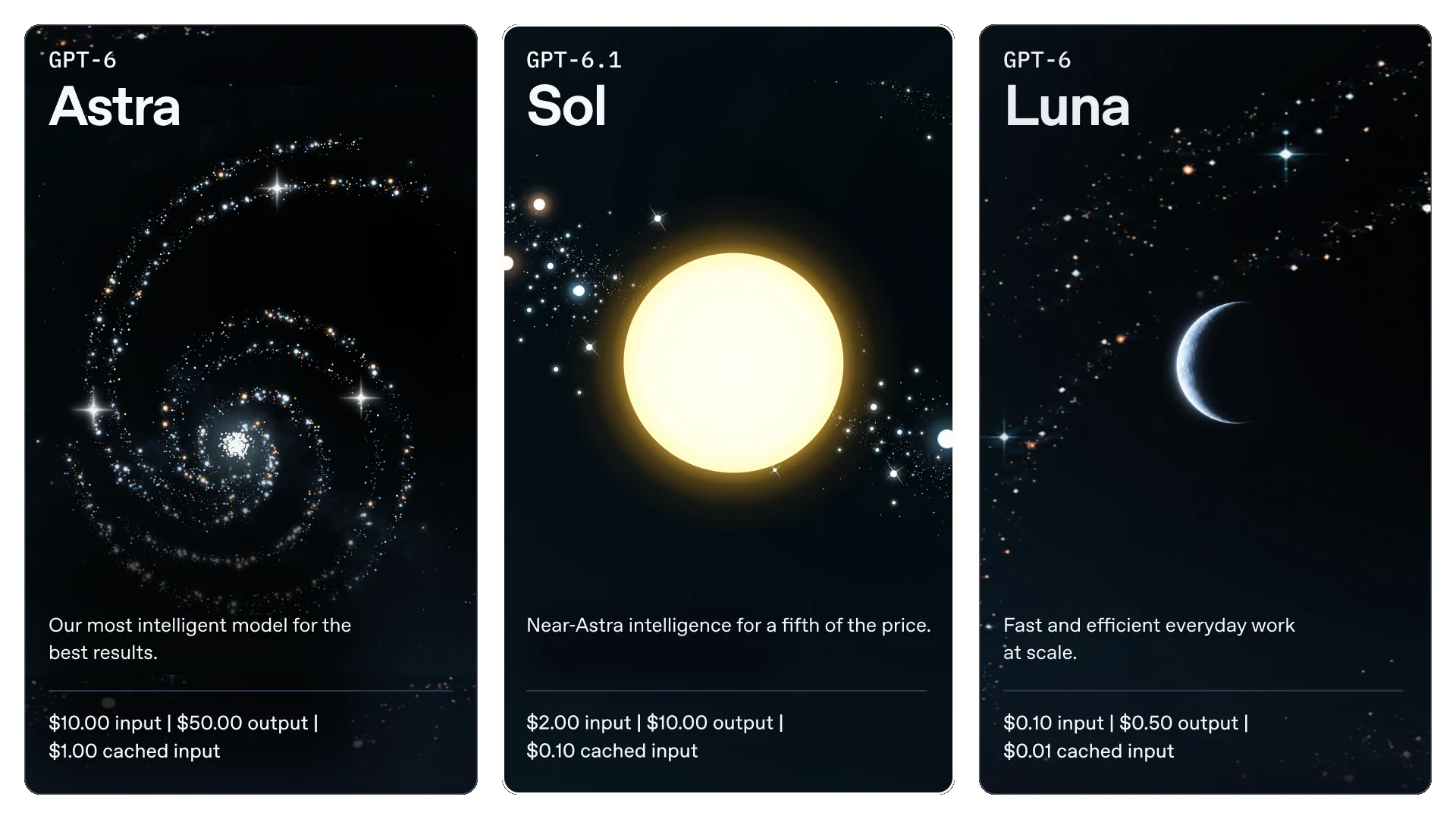 OpenAI’s launch illustration. Prices are per million tokens at Standard short-context rates. Source: GPT-6.1 Sol announcement.
Compared with GPT-6 Sol, the direct price change is the cache-read rate: $0.20 becomes $0.10. The uncached input and output rates are unchanged. Compared with Astra, Sol 6.1’s uncached input and output rates are one-fifth as high. That comparison is about token prices, not the cost of every completed task.
Three conditions can change your estimate:
- Long prompts: above 272K input tokens, the whole request moves to $4 input, $0.20 cached input, $5 cache write and $15 output per million tokens.
- Processing tier: Fast costs twice Standard; Batch and Flex are 50% lower than Standard where supported. Availability and latency requirements still matter.
- Other charges: regional processing adds 10% where available. Tool charges, cache writes and billed reasoning tokens need their own accounting.
A concrete cost example
Suppose a short-context request bills 100,000 uncached input tokens and 10,000 output tokens, with no other charges. Sol 6.1 costs $0.30: $0.20 input plus $0.10 output. Astra costs $1.50 for the same counts.
If those 100,000 input tokens are instead billed as a cache read, the Sol 6.1 request costs $0.11, excluding any earlier cache-write bill. The comparison is only valid when the token counts and charge categories really match. A visible 2,000-token answer may still have a larger billed output count because reasoning also consumes tokens. See OpenAI’s reasoning guide.
For a production budget, record total spend divided by accepted tasks. Include failed attempts. Then track human correction time separately. That tells you whether the cheaper model is saving money or moving work back onto your team.
Coding benchmarks: more effort can produce a worse result
OpenAI’s DeepSWE chart reports 75.2% at high, costing $0.65 per task. The older GPT-6 Sol peaks at 68.8% at max, costing $2.74. Astra’s highest displayed result is 74.1% at xhigh, costing $4.43. These are vendor evaluations in a specific research setup, not expected bug-fix success rates for your repository.
The new model’s own curve is more useful than a headline comparison: its DeepSWE score drops to 71.9% at xhigh and max. Buying more reasoning did not improve this test. Start with a realistic effort setting and an acceptance rule; do not use max as a quality guarantee.
Independent evidence points in the same direction. In Artificial Analysis’s September 29 evaluation, Codex with Sol 6.1 at xhigh scores 63 on Coding Agent Index v1.5, against 60 at max and 62 for Codex with Astra at max. The index combines DeepSWE v1.1, Terminal-Bench 4.0 and SWE-Atlas-QnA.
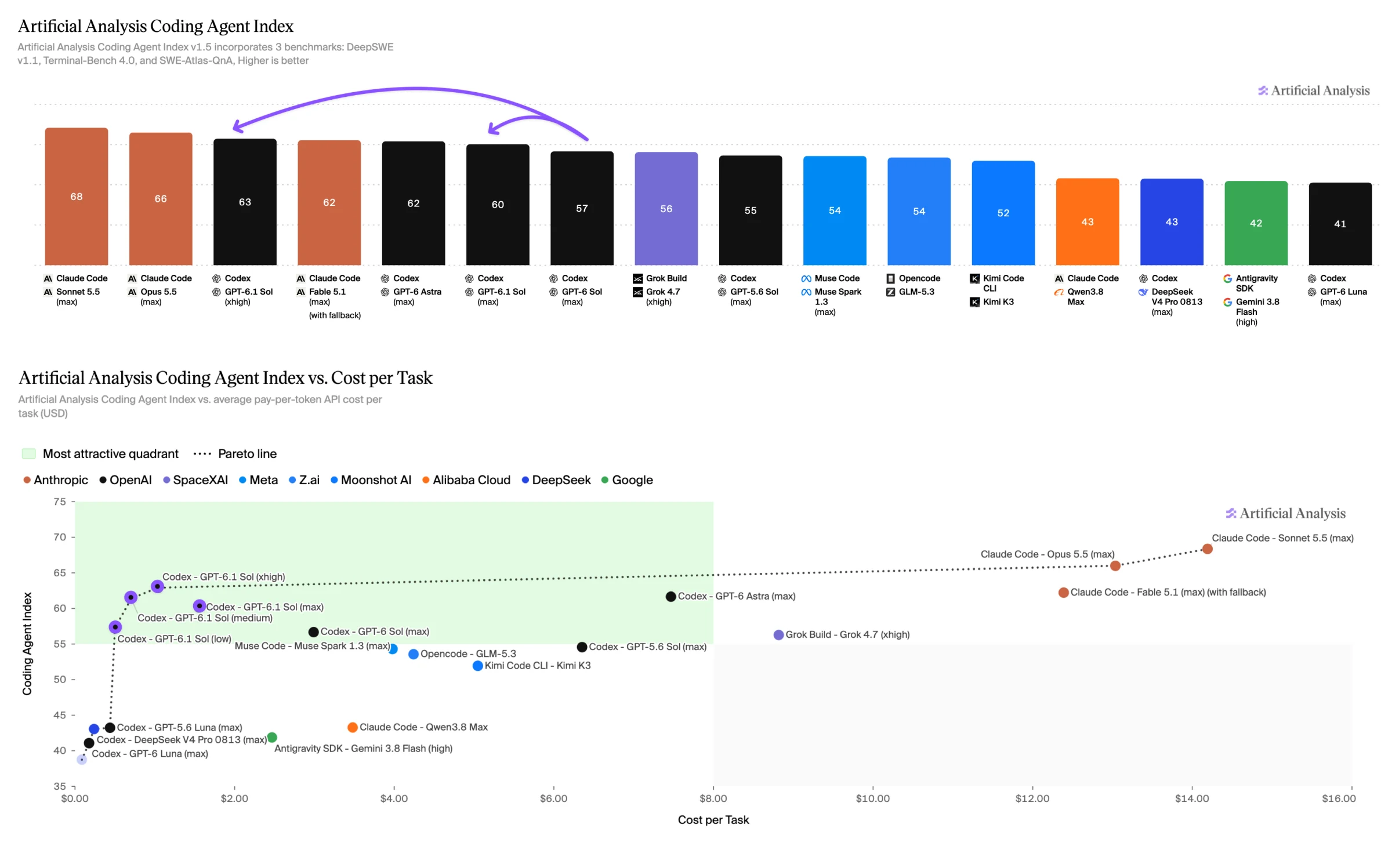 Independent coding-agent results published by Artificial Analysis. Agent harnesses and reasoning settings are part of the comparison; this is not an isolated model-only test.
For a developer, the sensible next test is an issue with a known failure, more than one relevant file and a check that catches an incomplete fix. Does the agent find the cause, change the right files and run the check? Does it keep working when the first attempt fails? Those observations are more useful than asking it to generate a polished demo from scratch.
The full coding chart also shows Claude Code with Sonnet 5.5 and Opus 5.5 ahead at their displayed settings. Sol 6.1’s appeal is the combination of capability and cost, not an across-the-board coding crown. Our Sonnet 5.5 review explains why review quality and workflow fit still need separate tests.
Documents, automation and computer use
Here is a compact reading of OpenAI’s launch charts. Each cell shows score · effort · cost per task. Settings were selected by the highest displayed score for that model, so this table does not hold reasoning effort constant.
| Evaluation | GPT-6.1 Sol | GPT-6 Astra |
|---|---|---|
| DeepSWE v1.1 | 75.2% · high · $0.65 | 74.1% · xhigh · $4.43 |
| GDP.pdf | 32.0% · high · $0.35 | 32.2% · xhigh · $1.91 |
| AutomationBench 1.0.6 | 36.1% · max · $0.30 | 41.4% · max · $1.73 |
| OSWorld 2.0 offline | 71.4% · max · $1.27 | 73.5% · max · $9.44 |
| Terminal-Bench Science 0.1 | 57.0% · max · $5.47 | 68.1% · max · $23.80 |
Source: OpenAI’s task and cost charts, read on October 1. OSWorld reports partial reward on the offline v2026.08.08 set, not a simple percentage of fully completed tasks. The benchmarks use different scoring rules; do not average their percentages.
Reading a PDF is different from producing a useful memo
GDP.pdf measures questions about complex professional PDFs. The small displayed gap to Astra makes Sol 6.1 worth testing on document-heavy work. It does not establish that an arbitrary uploaded report will be interpreted correctly.
Give both models the same PDF and ask for a decision memo with page references. Check one chart, one table, one footnote and a deliberately missing fact. A usable answer should identify missing evidence rather than supply a plausible number. For a Chinese memo, also check whether translated labels preserve the original units and dates. None of the figures above measures Chinese writing quality directly.
A workflow can look finished and still be wrong
AutomationBench and OSWorld are relevant when an agent must act, not merely explain. But a partial score can conceal the last failed step: a correct draft that was never saved, an updated field on the wrong record, or an export with the wrong date range.
Define completion as an observable artifact. For a CRM task, verify the record and fields. For a spreadsheet, inspect the exported file and formulas. Keep approval boundaries explicit for actions with consequences. More capable computer use does not remove the need for a final-state check.
Astra still has a case in scientific work
The science row has a substantial score gap. If the job is difficult simulation, data analysis or proof work and a missed result is expensive, keep Astra in the comparison. A cheaper successful task can be valuable; a cheaper run that cannot finish the research question is a different purchase. See our GPT-6 Astra API guide for its integration and cost constraints.
Independent tests: close to Astra, with limits
Artificial Analysis’s release comparison lists the following on Intelligence Index v4.3.2, a weighted mix of ten evaluations. The cost column is that organization’s cost per index task, not the price of a normal chat message.
| Sol 6.1 effort | Intelligence Index | Cost per index task |
|---|---|---|
| low | 42 | $0.13 |
| medium | 48 | $0.21 |
| high | 50 | $0.32 |
| xhigh | 51 | $0.39 |
| max | 52 | $0.72 |
At max, the independent launch comparison puts Sol 6.1 one index point below Astra, with task costs of $0.72 versus $3.26. That is about 78% lower cost on this evaluation mix. It is evidence for a useful cost-quality trade-off; it is not a claim of equal performance on every task.
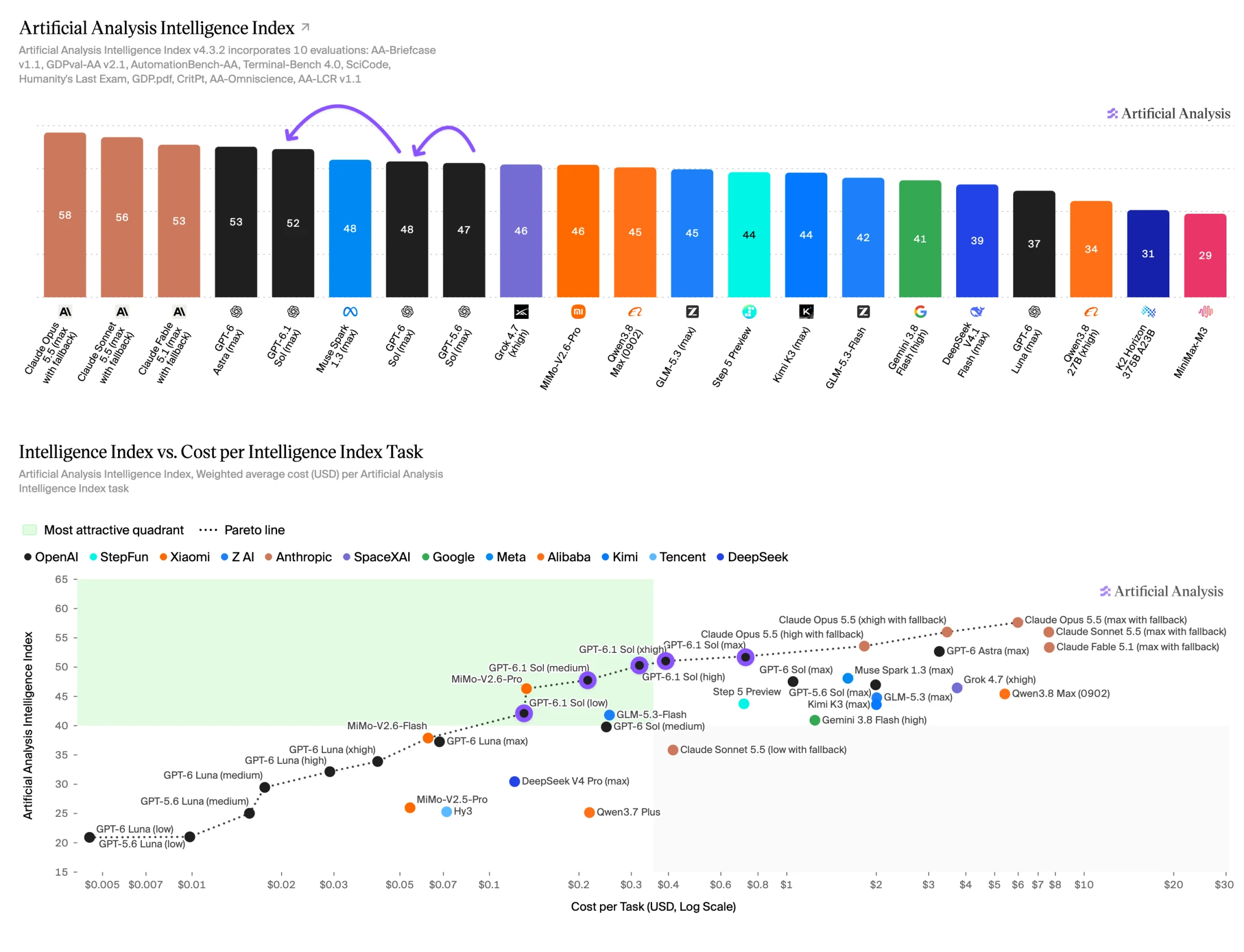 Independent launch charts from Artificial Analysis. Scores are index points, not accuracy percentages. Some competing configurations include fallback models.
There is also an important counterweight to the idea that the upgrade always uses fewer tokens. Artificial Analysis reports 10–30% more output tokens than GPT-6 Sol across effort settings on its Intelligence Index. Better capability and a cheaper bill can coexist with longer reasoning.
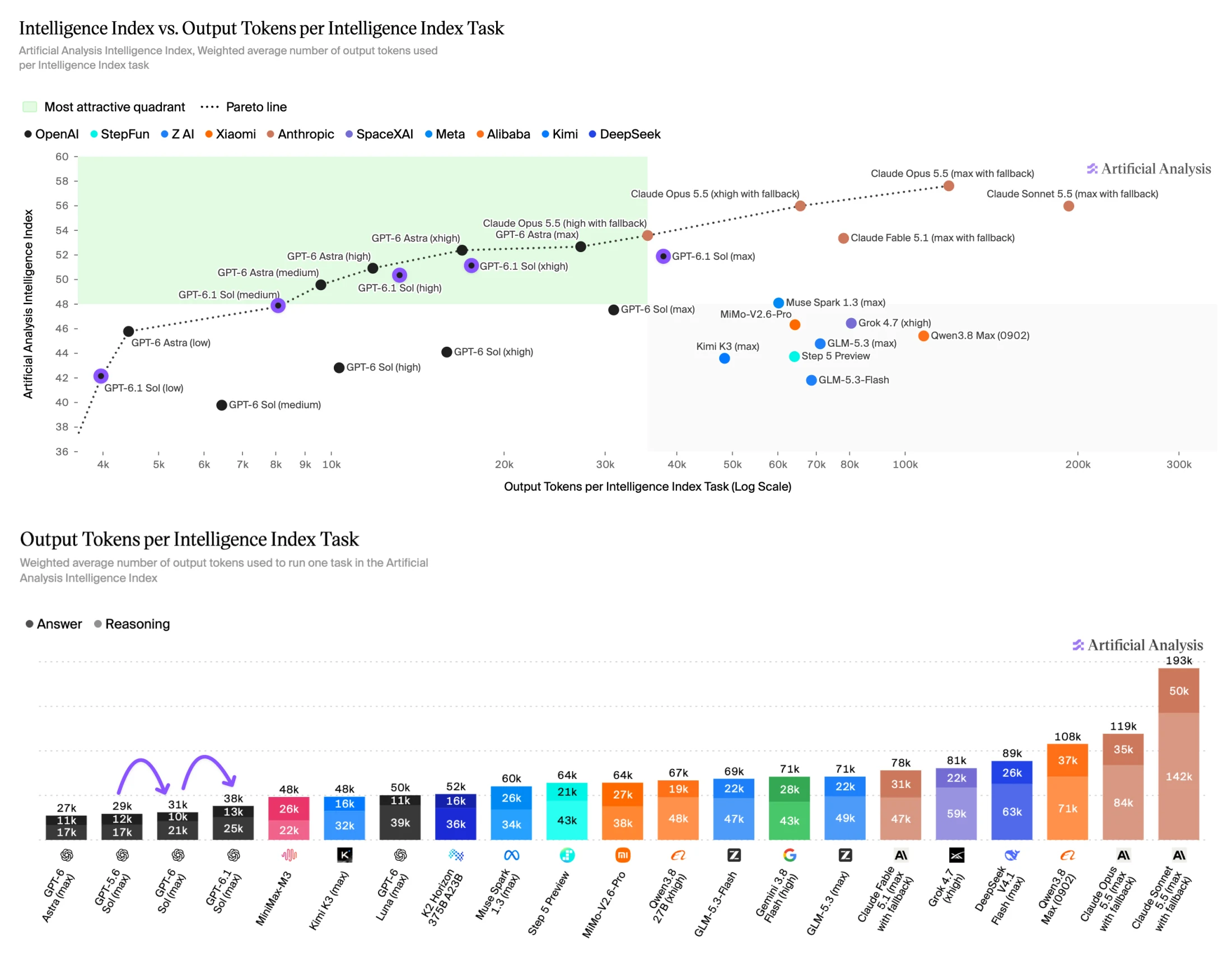 Token-use analysis from the same independent evaluation. This workload differs from OpenAI’s individual benchmark tasks.
The most useful lesson is to tune effort by job. Moving from medium to max raises this index from 48 to 52 while increasing its reported task cost from $0.21 to $0.72. Whether those extra points matter depends on what your user is trying to finish.
Factual accuracy: better scores still need verification
OpenAI’s factuality evaluation puts the share of answers containing a factual error at 7.7% for Sol 6.1 at low, against 11.4% for GPT-6 Sol. That is a 3.7 percentage-point drop, or about 32% relative reduction. The prompts were selected from conversations where users had flagged earlier errors, so this is not a typical-use error rate.
Do not turn that improvement into permission to skip sources. A claim can be neatly written, cite the wrong page and still look convincing. For research work, ask for evidence attached to each consequential claim, then open the sources and verify the numbers yourself. For current facts, a model’s training cutoff cannot substitute for a working search tool.
The Sol 6.1 system-card addendum also evaluates transparency, user restrictions and unsafe agent behavior. These are stress tests, not a guarantee that an agent will always disclose a broken tool or respect every boundary. Treat tool errors as explicit states in your application, require confirmation where the workflow calls for it and inspect the final action record.
API integration and migration pitfalls
Use the Responses API for Sol 6.1 tool calling. The model documentation allows Chat Completions for text generation but does not support tool calling through that endpoint. It also excludes none and minimal reasoning effort. This matters if an older integration used those settings to keep latency down.
The following Python example illustrates a text request. It has not been executed against a live API for this article. Use a current OpenAI SDK and keep the API key in your environment.
For the full request contract, see the Responses API reference and GPT-6 guide. Streaming and structured outputs are supported; Responses tools include search, computer use, shell, code interpreter and MCP. The September 29 changelog also announces multi-agent support in beta. Do not assume a beta feature or hosted tool is enabled merely because a text request succeeds.
Before migrating, check five things:
- Endpoint and tools: move an agent’s tool loop to Responses if it currently relies on Chat Completions function calling.
- Effort: choose a supported value explicitly for your first comparison. Retest defaults rather than assuming the old setting spends the same tokens.
- Output handling: inspect completion status, usage and tool results. A successful HTTP response does not prove that the requested work finished.
- Long context: run a case that crosses the 272K input threshold and check the resulting price category. A one-million-token window is a capacity limit, not a promise of short-context pricing.
- Access and processing region: the model supports US and EU residency, but Fast mode is unavailable with EU residency. Account limits and residency eligibility still apply.
If your current workload depends on none, Sol 6.1 is not a drop-in replacement for that configuration. Retain a rollback option while testing the new model. Our GPT-6 Sol and Luna comparison gives context for teams choosing a cheaper tier for well-defined subtasks.
GPT-6.1 Sol vs Astra, Sonnet 5.5 and Opus 5.5
Our recommendation is to test Sol 6.1 first for frequent, checkable work: scoped code changes, document questions with source references, and routine workflows whose final state you can verify. That recommendation follows the combined cost and capability evidence; it is not a measured result from our own production workload.
Keep Astra for the hardest cases in your test set. The official science results show a clear remaining gap. More broadly, a broad index that puts two models close together cannot settle ambiguous research, a difficult architectural decision or an unusual failure mode.
Keep Sonnet 5.5 and Opus 5.5 in a fair comparison if they already work well for your team. The independent coding chart compares whole agents, including Claude Code and Codex. Tool policies, prompts and fallbacks can affect the outcome. The launch’s AutomationBench chart also puts Opus 5.5 with fallbacks ahead at its highest displayed setting, even though Sol 6.1 has a cost advantage. A universal winner would hide those conditions.
For a useful migration decision, replay a small set of tasks from your own work:
| Task | Acceptance rule | What to record |
|---|---|---|
| Known repository bug | Regression fixed; unrelated behavior preserved | Checks, retries, review edits |
| PDF decision memo | Claims trace to pages; missing facts identified | Unsupported claims, omitted caveats |
| UI or business workflow | Correct artifact saved to the intended destination | Final state, permissions, recovery |
| Chinese technical explanation | Terms, units and qualifications preserved | Native-reader corrections |
Use the same starting files, instructions, tools and time limit. Try medium and high before escalating. Count an incomplete run as a failure even if the response reads well. Keep cost, elapsed time and human review time visible beside the acceptance rate.
FAQ
Is GPT-6.1 Sol free?
The API model page lists the Free tier as unsupported. Paid ChatGPT plan access and API billing are separate. A ChatGPT subscription does not turn the public API into free usage; check the model’s access and rate limits.
Can I use GPT-6.1 Sol in ordinary ChatGPT Chat?
OpenAI’s September 29 launch statement lists Work and Codex access and says ordinary Chat was not yet supported. This article was checked on October 1, 2026; confirm current availability in your own picker and OpenAI’s launch information.
Does a 1M context window mean every request costs $2/$10?
No. Prompts above 272K input tokens use higher rates for the full request. The pricing table lists $4 input and $15 output per million tokens for Sol 6.1 at Standard long-context rates.
Is GPT-6.1 Sol Ultrafast available?
The launch says Sol 6.1 Ultrafast is coming in the following days. Do not confuse that announcement with an active tier on every account. The Ultrafast documentation and your product’s model picker are the places to check before relying on it.
Should I always select max reasoning?
No. OpenAI’s DeepSWE results peak at high; Artificial Analysis’s Coding Agent Index has xhigh ahead of max. Higher effort can help a hard task, but the right setting is the one that meets your acceptance rule at an acceptable cost and delay.
Can Sol 6.1 browse the web or use a computer?
It supports web search and computer-use tools through Responses. Your application must actually connect and authorize those tools. The model’s knowledge cutoff is not live browsing, and a text-only request cannot manipulate your desktop by itself.
If your existing Sol workflow has a clear completion check, start there. Compare the new model at a moderate effort level, inspect the failures and raise the effort only where it earns a better accepted result. That is a stronger reason to migrate than a launch-day ranking.