TL;DR
Start with Google Flow and Veo 3.1 for cinematic clips with native audio. Choose Runway when generation, editing, export, and API access need to live in one workspace. Kling 3.0 and Seedance 2.5 are stronger fits for reference-heavy, multi-shot work; Firefly for Adobe teams; Luma for modifying footage; Vidu for longer multilingual scenes; Pika for quick social effects; and HeyGen for presenter-led business video.
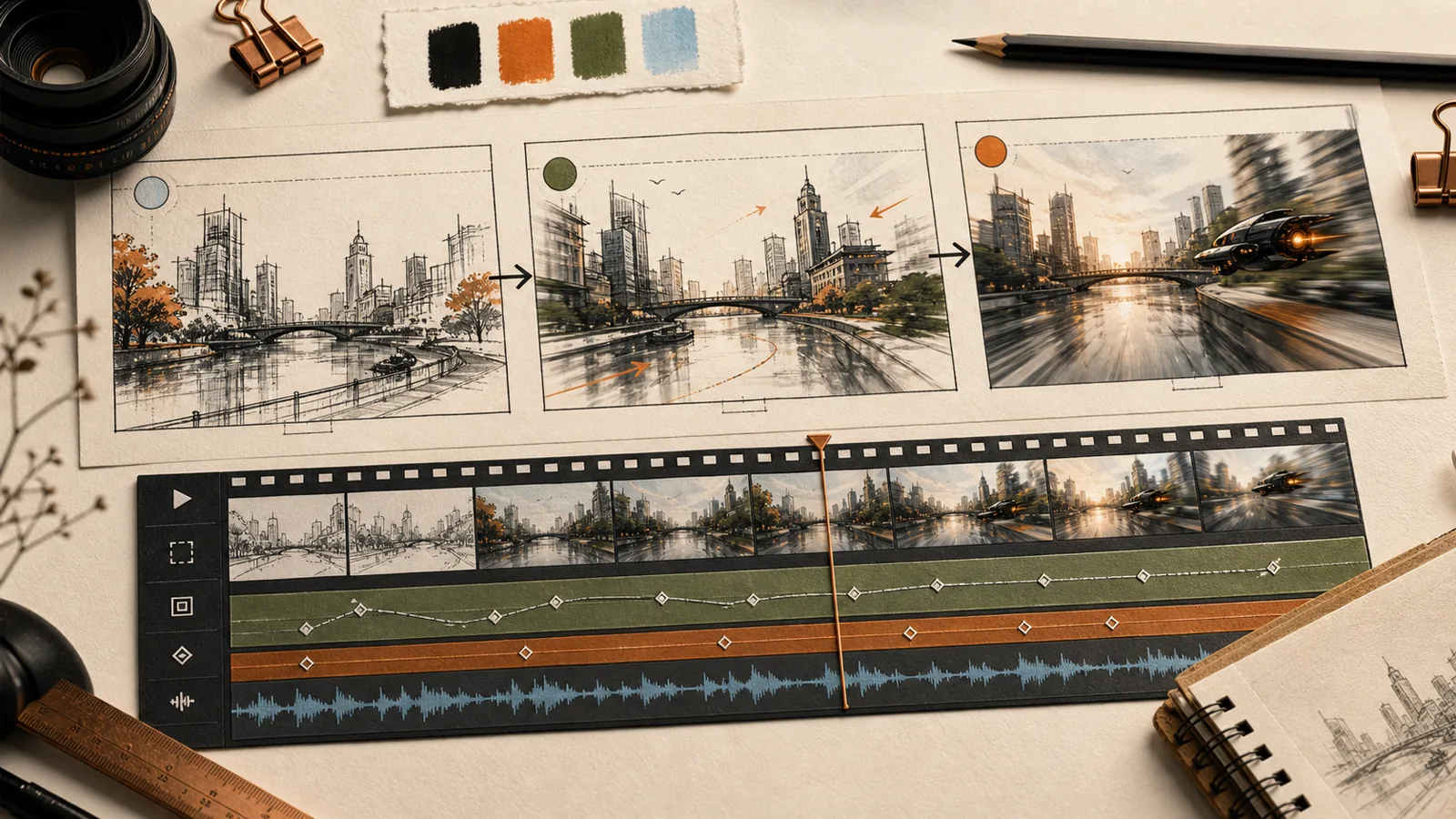 The useful question is not which model can make one beautiful clip. It is which product can carry your idea to a video you can actually publish.
AI video has moved beyond the silent, six-second curiosities that defined the category. Leading products now generate dialogue and sound effects, hold a subject across references, plan several shots, modify existing footage, and hand work into a real editor. That progress also makes the buying decision harder. A model that wins a blind prompt vote may still be the wrong product for a campaign, a short film, or a training video.
This guide compares the best AI video generators in 2026 by the work they are built to finish. It draws on current product documentation, live product surfaces, independent category reviews, and a dated model arena. It is not a controlled Mengbi quality test, and it does not pretend that one prompt can settle the market.
Quick answer
For cinematic clips with native audio, Google Flow with Veo 3.1 is the clearest general starting point. Pick Runway when the workspace matters as much as the model: it combines generation, transformation, exports, and API access. Kling AI 3.0 and Seedance 2.5 deserve a serious look for reference-heavy, multi-shot work, especially when Chinese dialogue or access through Chinese products matters.
Choose Adobe Firefly when the result must continue into Premiere Pro. Luma Dream Machine is more interesting when you already have footage and want to transform it. Vidu Q3 fits longer multilingual scenes, while Pika is the faster social-effects tool. HeyGen belongs in the list for a different reason: it produces presenter-led explainers, training, sales, and localized business video rather than isolated cinematic shots.
The shortlist at a glance
First decide what “AI video generator” means for your job
Search results tend to put four different products in one basket. Short-shot generators such as Veo and Kling turn text or references into a scene. Production workspaces such as Runway and Firefly add model selection, iteration, editing, and hand-off. Video-to-video tools change footage you already shot. Avatar systems such as HeyGen build a structured presentation from a script and presenter.
Those products overlap, but they do not replace one another cleanly. A filmmaker may use an image generator for character references, Veo for an establishing shot, Luma for a transformation, and Premiere for the final cut. A sales team may skip all of that and use HeyGen to turn a product brief into a narrated deck.
The inputs matter too. If you are still building references or storyboards, start with our . If the script, audience, and narrative spine are unclear, the is the more useful first step. Better pre-production usually saves more credits than a clever prompt written at the last minute.
What changed in 2026
Native audio is now part of the main comparison. Veo 3.1, Kling 3.0, Seedance 2.5, and Vidu Q3 can all produce some combination of dialogue, sound effects, ambience, or music with the video. References have also become more specific: a product may accept a start frame, an end frame, several character images, a source video, an audio cue, or even a rough 3D layout.
Longer clips do not automatically mean finished films. They do make shot planning less fragmented. Seedance 2.5 can generate up to 30 seconds and extend the result; Kling and Vidu can carry a scene beyond the old six-second loop. A filmmaker interviewed by Creative Bloq described how multi-shot tools changed planning for a previously unmakeable project, but the account also makes the human work visible: story, shot selection, continuity, and editing still decide whether the result feels intentional ().
One familiar name is missing from the active shortlist. OpenAI's official Sora pages state that the Sora product was discontinued on April 26, 2026 (). Many roundups still show it, so checking availability matters as much as reading a model review.
Google Flow with Veo 3.1: the best general cinematic starting point
Veo 3.1 is the easiest first recommendation for someone who wants a cinematic scene, synchronized audio, and a reasonably guided interface. In Flow, “Ingredients to Video” lets a creator establish characters, objects, and environments from reference images. Google also added native 9:16 generation and 1080p or 4K options across parts of Flow, the Gemini API, and Vertex AI (, ).
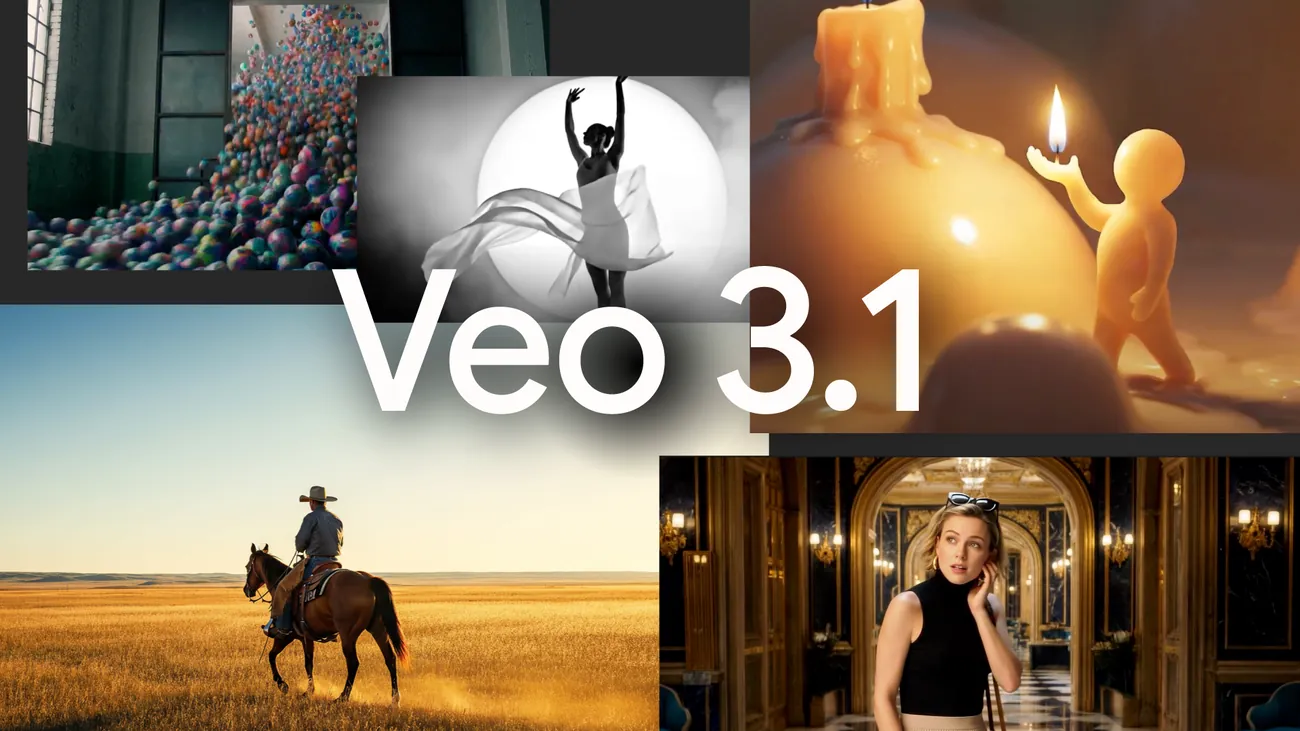 Google's Veo 3.1 launch visual shows the model's range, but the practical advantage is Flow's reference and iteration loop. Source: Google.
The surface feels like a filmmaking tool rather than a single prompt box. You build a shot around ingredients, review a clip, then continue or revise. That suits mood films, product concepts, establishing shots, and vertical social pieces where sound is part of the idea.
The limitation is still continuity across a whole production. A good ten-second scene does not keep wardrobe, product geometry, pacing, and dialogue stable across every later shot by itself. Use Flow as a shot-making environment, then plan for selection and editing elsewhere.
Runway: the most complete professional workspace
Runway earns its place through product shape. The generation screen can take a start frame, a text description, presets, and a selected model. The same workspace reaches beyond Gen-4.5 into video transformation, editing, exports, and developer access. Runway's current documentation lists Gen-4.5 for text-to-video and image-to-video, with clips from two to ten seconds and documented aspect-ratio controls (, ).
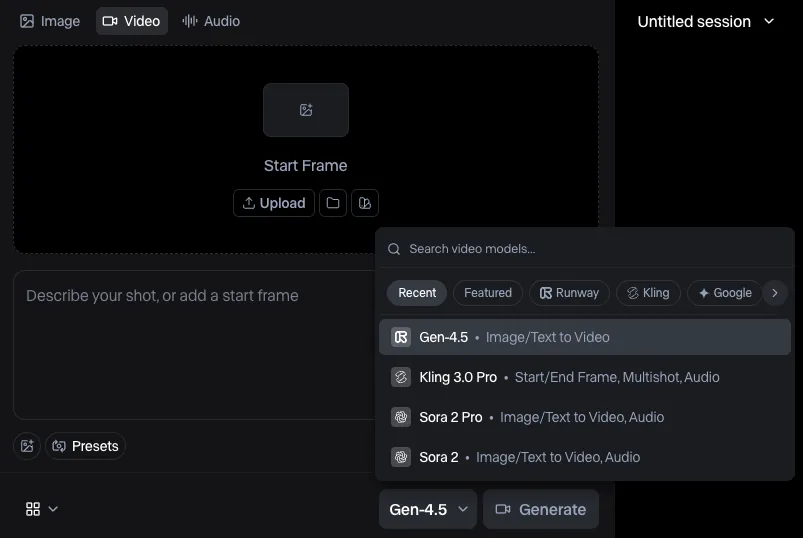 Runway exposes the product decision directly: choose the input, describe the shot, then select the model that fits the job. Source: Runway.
That model selector is important. Runway is increasingly a production layer, not merely one model. A studio can compare approaches without moving every asset between unrelated apps, then connect repeated work through an API. This is also why Runway makes more sense for teams already considering the automation patterns in our .
The trade-off is complexity and cost visibility. Different models consume credits differently, and the strongest mode for one shot may be unnecessary for the next. Runway rewards someone who can name the shot, choose the right mode, and stop iterating when the material is good enough to edit.
Kling AI 3.0: strong reference control for ads and multi-shot stories
Kling 3.0 is no longer a side note for a regional market. Kuaishou launched Video 3.0 and Video 3.0 Omni globally with text, image, audio, and video inputs; subject references; multi-shot direction; clips up to 15 seconds; and native audio across several languages, accents, and Chinese dialects ().
The workflow is especially useful for an ad or story that has a recurring person, product, or location. Instead of asking the model to rediscover the subject in every prompt, you can bring references into the generation and describe the sequence of shots. Native dialogue also makes Kling more relevant to Chinese-language creative work than an English-only model leaderboard would suggest.
There is still a gap between reference control and guaranteed continuity. Hands, logos, small product details, and speaker identity can drift when the scene becomes crowded. Treat references as constraints that improve the odds, not as a substitute for a continuity review.
Seedance 2.5: the most ambitious reference-led long-form option
Seedance 2.5 pushes furthest toward completing a scene rather than generating a moment. ByteDance says a single generation can run up to 30 seconds, followed by two extensions. One request can also include as many as 30 images, 10 video clips, and 10 audio clips, with timestamp-level instructions and targeted editing for characters, actions, camera positions, green screens, and other details (, ).
 Seedance 2.5 is built around longer, reference-heavy audio-video creation. This official frame comes from ByteDance Seed's launch material. Source: ByteDance Seed.
For Chinese users, access is part of the recommendation. At launch, Seedance 2.5 began rolling out through Jimeng AI and Doubao Pro, while BytePlus ModelArk API access was still described as coming soon. That makes it easier to try locally than a model that exists only in a research page, but teams planning an API integration should confirm the current release status first.
The scale of the reference system is powerful and potentially cumbersome. Thirty images are useful only when they express a coherent visual plan. A smaller set of approved character, product, location, motion, and audio references will usually produce a cleaner brief than uploading everything in the project folder.
Adobe Firefly: the best hand-off for Adobe teams
Firefly's strongest argument is not that Adobe owns the one best model. It is that the product lets an Adobe team generate with Firefly or partner models, control format and camera references, and continue the work in the tools already used for finishing. Adobe's current Generate Video documentation covers model choice, text and image inputs, aspect ratio, composition, motion references, camera controls, sound effects, and opening the result in Firefly's editor or Premiere Pro ().
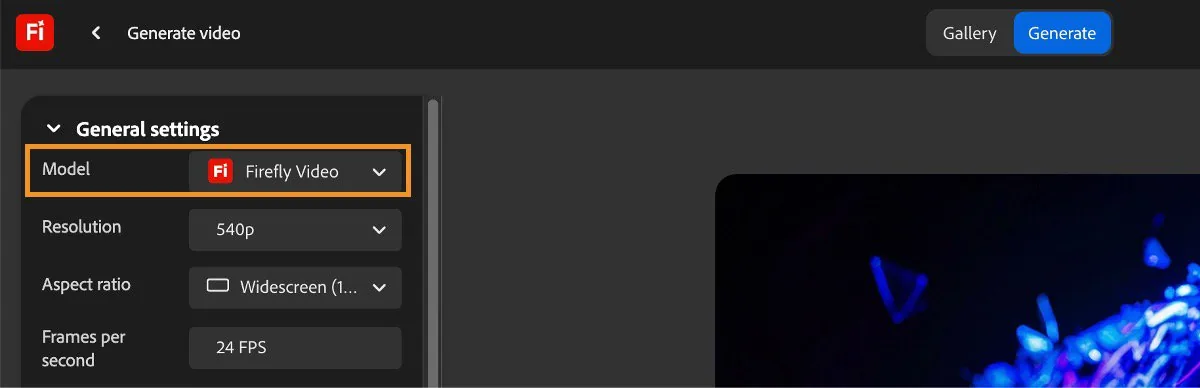 Firefly puts production settings in the interface before generation, then offers a familiar path into Adobe editing. Source: Adobe.
That is valuable for campaign teams with brand assets, review habits, and existing project files. A generated shot can remain one element in a conventional edit rather than becoming a separate AI experiment. Adobe also promotes its Firefly models as designed for commercial use, but that positioning is not legal advice. Check the terms for the exact model and asset source, especially when partner models are selected.
If the team does not use Creative Cloud, Firefly loses much of its edge. The reason to choose it is the hand-off, not the logo on the generation button.
Luma Dream Machine: for transforming footage, not only making it
Luma's current product is easiest to understand as a visual modification studio. Ray3.2 focuses on changing existing video with instructions and references, while Ray3.14 covers text-to-video, image-to-video, keyframes, native 1080p, and HDR-oriented output. Luma's own field guide is careful about the distinction between model versions, which is useful in a market that often treats every number as a simple upgrade (, ).
Use Luma when the source video already contains the timing, performance, or camera move you want. A video-to-video pass can change the world around that motion without asking a model to invent the choreography again. That suits stylized transitions, environment changes, concept work, and shots where an existing take is the best control signal.
Do not choose a mode by the largest version number. Decide whether the job is generation, keyframed interpolation, or modification, then use the model built for it.
Vidu Q3: longer multilingual scenes with camera control
Vidu Q3 occupies a useful middle ground. Its official model page describes native-audio clips up to 16 seconds, English, Chinese, and Japanese output, multiple speakers, and frame-aware camera control (, ). That combination makes it relevant to narrative ads and short scenes where dialogue and camera direction need to arrive together.
The product is worth testing against Kling and Seedance with the same script. Vidu's 16-second window may be enough for a compact exchange, while its multilingual support can reduce the awkward workflow of generating a silent picture and replacing every sound later.
Native audio still needs editorial review. Listen for the speaker changing identity, the line landing at the wrong beat, ambience masking speech, and lip movement drifting on longer sentences. Audio generation removes a step only when the sound survives the cut.
Pika: the quickest route to a social effect
Pika is the least formal tool in this shortlist, and that is a strength. It is well suited to a creator who wants an object to transform, a scene to explode, a character to perform an impossible action, or a short clip to gain a conspicuous visual treatment. Pika 2.5 remains part of its current stack, while 2026 updates added soundtrack, sound effects, music, and speech tools (, ).
This is a faster path to a shareable moment than building a multi-reference production. It fits social posts, transitions, reaction clips, and creative tests where the effect is the point.
Pika is not the obvious place to maintain a ten-shot campaign with strict product continuity. Use it to make the moment, then finish the sequence in an editor.
HeyGen: the practical choice for presenter-led business video
HeyGen solves a different production problem. Its AI Studio is organized around a script, an avatar and voice, a central canvas, and a scene storyboard. A training team can turn a document into a narrated sequence, apply a brand system, revise scene by scene, and localize the result without hiring a new presenter for each language (, ).
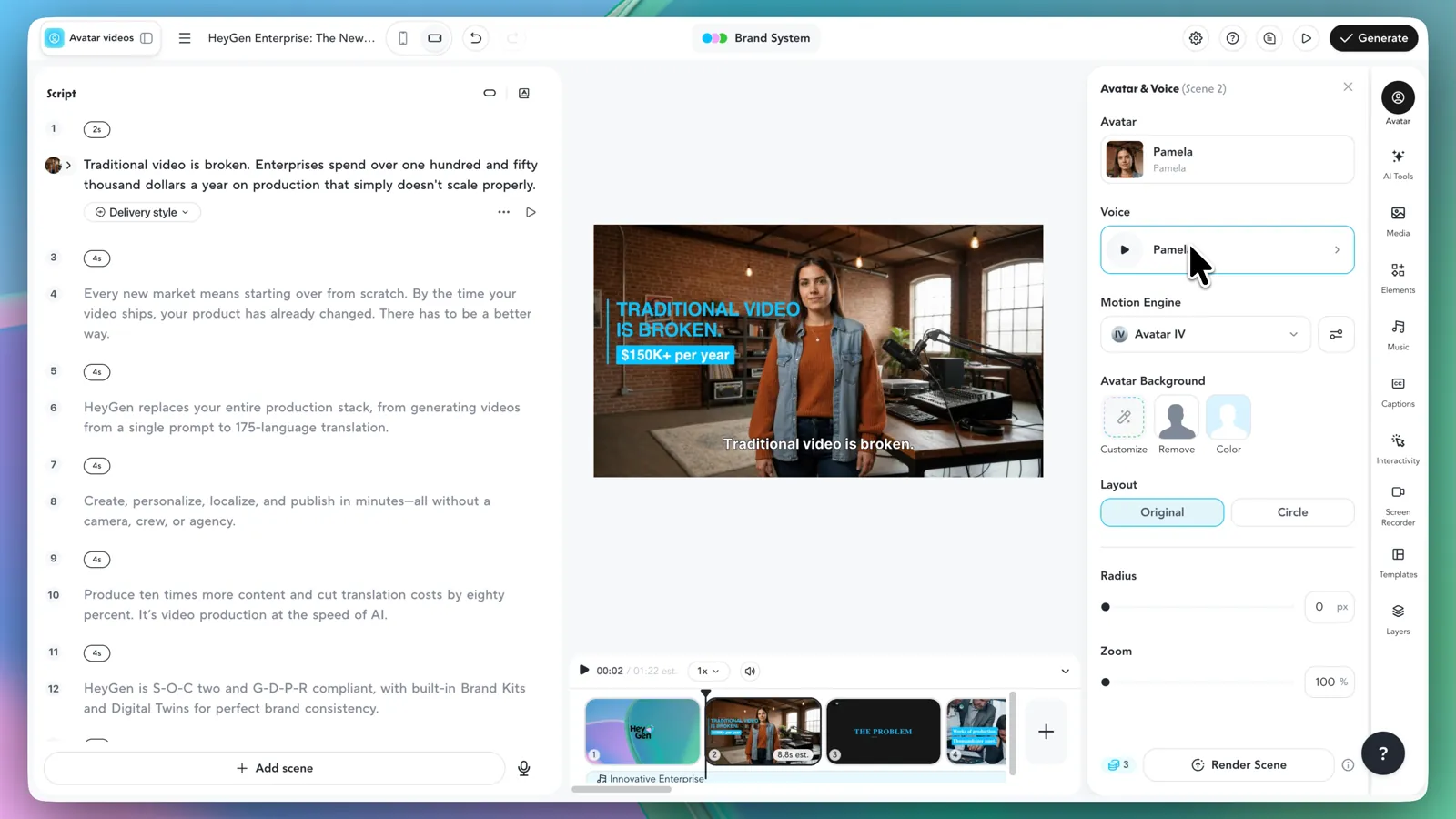 HeyGen's interface makes the category difference obvious: the unit of work is a structured, presenter-led video, not a single cinematic clip. Source: HeyGen.
That makes HeyGen more useful than Veo for onboarding, sales outreach, course lessons, product explainers, and recurring internal communication. It can create longer, reusable business assets while the cinematic generators are still producing ingredients for an edit.
The risk is the “synthetic presenter” look. A believable avatar does not rescue a stiff script, dense slide, or generic delivery. Write for speech, shorten scenes, and let a real person review names, claims, pronunciation, and cultural tone before a localized version goes live.
How to test AI video generators without burning credits
Do not send nine products nine unrelated prompts. Prepare one small project with a clear destination: a 15-second vertical ad, a three-shot brand film, or a one-minute presenter explainer. Use the same approved reference image, the same spoken line, and the same required final format wherever the products support them.
Run three checks. First, generate a straightforward shot and see whether the composition and motion obey the brief. Second, make one revision that should preserve everything else, such as changing only the camera move or one prop. Third, complete the hand-off: export the file, place it in the editor, inspect audio, and see whether another person can pick up the project.
Judge usable seconds, not the prettiest thumbnail. Record how many attempts produced material you could actually cut, how much cleanup was needed, whether the subject drifted, and where the audio failed. The independent Artificial Analysis arena can provide a dated blind-vote quality signal, but its model ranking does not evaluate your product references, editor, export path, support, or rights review ().
What we left out
Sora is not in the active list because OpenAI says the product is no longer available. Wan 3.0 appears near the top of current blind-vote results, but Artificial Analysis labels it “coming soon”; it would be misleading to recommend an unavailable product as something a reader can open today. Traditional editors with isolated AI features are also outside the main list unless generation is central to the product.
The boundary will keep moving. Zapier's current human-reviewed comparison similarly separates dedicated generators from the wider universe of editors and suites, and it reaches different winners for reliability, filmmaking, and commercial workflow (). That is a useful reminder that “best” only has meaning after the job is named.
Frequently asked questions
What is the best AI video generator in 2026?
Google Flow with Veo 3.1 is the strongest general starting point for cinematic clips with native audio. Runway is better when a professional workspace, transformation tools, exports, and API access matter. Kling 3.0 and Seedance 2.5 are compelling for multi-shot, reference-heavy production. There is no universal winner across cinematic shots, social effects, and presenter video.
Which AI video generator is best for ads and social media?
Use Kling or Seedance when an ad needs recurring products, people, or several shots. Veo is strong for cinematic concepts and native audio. Pika is faster for a single social effect. For a presenter-led product explanation, HeyGen is the more complete route.
Which AI video generator has the best native audio?
Veo 3.1, Kling 3.0, Seedance 2.5, and Vidu Q3 all make native audio part of the product. The best choice depends on language, clip length, dialogue, and access. Test the actual spoken line because lip sync, speaker identity, pacing, and ambience can fail differently.
Can AI video generators make a full film?
They can now make longer scenes and more connected multi-shot sequences, but a finished film still needs a script, continuity plan, shot selection, editing, sound review, rights checks, and delivery. Treat generated video as production material, not an automatic final cut.
Is AI-generated video safe for commercial use?
There is no single answer. Review the terms for the exact product and model, the rights to every reference asset, likeness and trademark issues, disclosure requirements, and the rules of the platform where the video will run. Adobe's commercial positioning is useful context, not a substitute for legal review.
Are there free AI video generators?
Several products offer trials or limited free credits at different times, but video plans change quickly and the strongest models or exports are often restricted. Check the official pricing page on the day you buy, then estimate the cost of usable output rather than the cost of one generation.
Method and sources
This guide was last reviewed on August 26, 2026. We compared current product documentation, access paths, interface shape, reference controls, audio, duration, editing, export, and production hand-off. We did not run a controlled cross-model benchmark and do not present vendor demos as independent proof.
The main sources are the official Google, Runway, Kuaishou, ByteDance Seed, Adobe, Luma, Vidu, Pika, HeyGen, and OpenAI pages linked in the relevant sections. Independent context comes from , , and the dated . Product limits, prices, and availability can change, so verify them on the vendor's current page before purchasing.
AI tools mentioned
MENGBI
Building with AI? Let’s talk.
Get listed on Mengbi, or access leading AI models through one API with better pricing.
Related reading
The 10 Best AI Image Generators for Real Projects in 2026
Compare 10 leading AI image generators for photorealism, text, editing, consistency, design, APIs, and commercial creative work in 2026.
Best AI Coding Agents 2026: Cursor vs Claude Code & Codex
Compare Cursor, Claude Code, Codex, OpenCode and Copilot by IDE vs terminal workflow, pricing model, open-source options, and team fit.
Best AI Meeting Assistants 2026: Bot vs Bot-Free Tools
Compare Fireflies, Otter, Fathom, Granola, tl;dv and Krisp for transcription, meeting notes, free plans, integrations, and bot-free capture.